AI Dark Mode Switcher
Smartly switch between light and dark themes based on your schedule or system preferences
Version 3.2.1 - Privacy-Focused, No Tracking
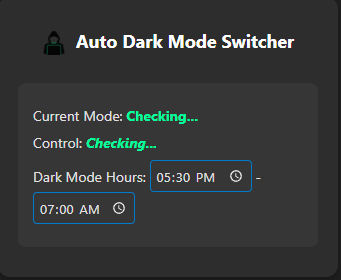
🤖 AI Mode
6:30 PM - 8:30 AM
Automatic dark mode using system time. No setup required - just works with intelligent scheduling.
⚙️ Manual Mode
Custom Times
Set your own dark mode schedule with precise time control. Perfect for personalized routines.
🔄 Smart Toggle
Seamlessly switch between AI and Manual modes with one click. Visual feedback shows current mode.
🔒 Privacy First
No external tracking or data collection. Your browsing habits stay private and secure.
⚡ Real-time Updates
Status updates every second to reflect current time and mode. Always know what's active.
💾 Persistent Storage
Your settings saved across browser sessions. Never lose your custom configurations.
Technical Specifications
Manifest
Version 3 (Chrome API v3)
Version 3 (Chrome API v3)
Background
Service Worker
Service Worker
Storage
Chrome Local Storage
Chrome Local Storage
Permissions
storage, tabs, scripting, contextMenus
storage, tabs, scripting, contextMenus
CSP
Web Store Compliant
Web Store Compliant
Error Handling
Robust with Fallbacks
Robust with Fallbacks
Installation Instructions
Follow these steps to install AI Dark Mode Switcher on your Chrome browser
Step 1: Unzip Extension Files
- Download the AI Dark Mode Switcher extension ZIP file
- Extract/unzip the contents to a folder on your computer
- Make sure you have all files: manifest.json, popup.html, popup.js, background.js, styles.css, and icons/ folder
- Keep the extracted folder in a safe location for the next steps
Step 2: Open Chrome Extensions
- Open Google Chrome browser
- Click the three dots (⋮) in the top-right corner
- Select "More tools" → "Extensions"
- Or type
chrome://extensions/in the address bar
Step 3: Enable Developer Mode
- Toggle on "Developer mode" in the top-right corner
- You'll see new buttons appear: "Load unpacked", "Pack extension", and "Update"
- This enables loading local extensions for development
Step 4: Load Extension
- Click the "Load unpacked" button
- Navigate to the folder containing your extension files
- Select the folder (it should contain manifest.json, popup.html, etc.)
- Your extension will be loaded and ready to use!
Important Notes:
- Keep the extension folder in a safe location - deleting it will remove the extension
- After making changes to your extension files, click "Update" to reload
- Your extension will appear in the Chrome toolbar as an icon
- Click the extension icon to open the popup and start using AI Dark Mode Switcher